Glue sticks are a popular method for improving first-layer adhesion, but removing their residue from a 3D printer bed can be tricky. This guide provides safe, practical steps and tool recommendations to restore a smooth bed surface without damaging the printer.
By following a few careful cleaning practices, users can maintain print quality and extend bed life. The process is straightforward when the right materials are on hand and safety precautions are observed.
Quick Answer
Use isopropyl alcohol 99% to dissolve glue stick residue, then wipe with a microfiber cleaning cloth. For stubborn spots, gently scrub with a nylon bristle brush and finish with a adhesive remover glue stick residue remover if needed. Always protect the area and dry completely before printing again.
What You’ll Need
- 3D printer bed scraper plastic angled 60mm
- isopropyl alcohol 99% for 3D printer bed cleaning spray
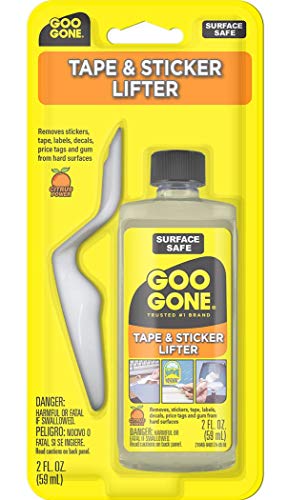
- adhesive remover glue stick residue remover
- microfiber cleaning cloth 12×16 inch
- nylon bristle brush for printer bed cleaning


Before You Start
Ensure the printer is turned off and cooled to a safe temperature before cleaning. Work on a non-slip surface to avoid accidents. If your bed is heated, allow it to cool completely before applying solvents. Keep solvents away from hot components and avoid inhaling fumes. Perform a small test spot on a hidden area to confirm compatibility with your bed surface before full cleaning.
Step-By-Step: How To Clean Glue From Print Bed
- Power off the printer and unplug it. Allow the bed to cool if it was recently heated.
- Remove any removable print surfaces or tapes as needed, and gently lift the bed surface if possible.
- Moisten a microfiber cleaning cloth with isopropyl alcohol 99% and lay it over the glue residues. Let it sit for 30–60 seconds to loosen the adhesive.
- Gently wipe the area in a circular motion to lift the glue. Avoid scrubbing too hard to prevent surface damage.
- If adhesive remains, apply a small amount of adhesive remover glue stick residue remover to the cloth and continue wiping.
- For stubborn spots, use the nylon bristle brush for printer bed cleaning lightly to scrub the residue. Do not apply excessive pressure.
- Wipe again with a clean microfiber cloth dampened with isopropyl alcohol to remove any loosened residue.
- Dry the bed completely with a dry microfiber cloth. Ensure no moisture remains in the printer’s seams or alignment surfaces.
- Reinstall the print surface and relevel the bed as needed before next printing.
- Run a test print on plain filament to verify the surface is clean and adhesion is consistent.
- Document the cleaning session if residue recurs, as frequent glue use may require alternative adhesion strategies.
- Store cleaning materials in a cool, dry place away from direct sunlight and heat sources.
Troubleshooting
| Symptom | Likely Cause | Fix | Prevention |
|---|---|---|---|
| Residue remains after cleaning | Residue embedded in bed coating | Repeat cleaning cycle with alcohol and adhesive remover; consider a light mechanical scrub | Switch to a lighter adhesive method or different bed surface |
| Surface becomes dull or scratched | Too much scrubbing or abrasive materials | Use gentle motions and a soft cloth; switch to non-abrasive tools | Regular maintenance and proper cleaning frequency |
| Adhesion worsens after cleaning | Overuse of solvent or residue remains | Thoroughly rinse with isopropyl alcohol and dry; relevel the bed | Limit solvent exposure and test on small area first |
| Cloth fibers left on bed | Cloth shedding | Switch to a new microfiber cloth; wipe again with clean cloth | Choose high-quality, lint-free cloths |
Common Mistakes
- Over-soaking the bed with solvent, which can damage coatings
- Using harsh or abrasive scrapers that scratch the surface
- Skipping a full dry period after cleaning, leading to print adhesion issues
- Not testing on a small area before full cleaning
Be mindful of surface compatibility and always verify manufacturer guidance for your bed type before cleaning.
Tips For Best Results
- Use isopropyl alcohol 99% in a well-ventilated area and avoid inhaling fumes directly.
- Keep a dedicated set of cleaning tools for the printer to prevent cross-contamination with other devices.
- Regularly inspect bed coatings for wear and refresh with approved surface protectants if recommended by the manufacturer.
- Prefer gentle tools and slow, even strokes to preserve bed integrity.
Call A Professional
Seek professional help if the bed surface shows persistent damage, significant coating degradation, or if improper cleaning has affected calibration. Stop cleaning and consult the manufacturer’s support or a certified technician when unfamiliar residues appear or if disassembly is required.
FAQ
Can I use acetone to remove glue stick residue?
Acetone can damage many bed surfaces. Use isopropyl alcohol or manufacturer-recommended cleaners first, and only switch to harsher solvents if explicitly advised.
Is it safe to clean a heated bed with solvents?
Most cleaners are safer when the bed is cool. If cleaning a warm bed is necessary, use caution and allow it to cool fully before applying solvents.
How often should I clean glue residue from the bed?
Clean as needed when residue affects adhesion or print quality. Regular maintenance intervals reduce buildup.
What if adhesion keeps failing after cleaning?
Relevel the bed, inspect the surface for damage, and test with a smaller print to diagnose adhesion issues beyond glue residue.
Which tools are dedicated to bed cleaning?
Use a dedicated plastic bed scraper, microfiber cloths, a nylon brush, and approved cleaning solvents to avoid cross-contamination with other printer components.
Buying Guide
When selecting tools for cleaning glue from a print bed, consider the following factors:
- Bed surface compatibility: Check whether the bed uses PEI, glass, or tape-backed surfaces, and select solvents and tools that are safe for that coating.
- Size and reach: A 60mm angled plastic scraper offers precise edges for small areas without scratching edges, while larger scrapers speed up broader cleanup.
- Cleaning performance: High-quality microfiber cloths and a nylon bristle brush can efficiently lift residues without abrasion.
- Solvent choice and safety: Isopropyl alcohol 99% is effective and widely compatible; ensure proper ventilation and storage.
- Ease of maintenance: Reusable cloths and a dedicated cleaning kit simplify routine upkeep and reduce downtime.
- Cost and availability: Consider a bundle that includes a scraper, alcohol, brushes, and cloths for consistent supplies.
Choosing the right combination depends on bed type, frequency of glue use, and the user’s comfort with solvents. Are you preparing for a busy printing schedule or a one-off maintenance session? A simple kit often covers most needs, while advanced users may want specialized cleaners.