DS game cartridges can accumulate dust, fingerprints, and oils from handling, which may cause read errors or intermittent gameplay. This article provides a practical, step-by-step approach to cleaning DS cartridges while protecting the pins and plastic casing. It emphasizes safe methods and readily available tools to keep your games functioning smoothly.
Quick Answer
Gentle cleaning with isopropyl alcohol wipes or a dedicated DS cartridge cleaning kit is usually enough. Avoid soaking cartridges, never spray cleaner directly on the pins, and dry thoroughly before reuse. For stubborn grime, use a pin cleaner tool and follow up with a quick, non-abrasive wipe to restore contact quality.
What You’ll Need
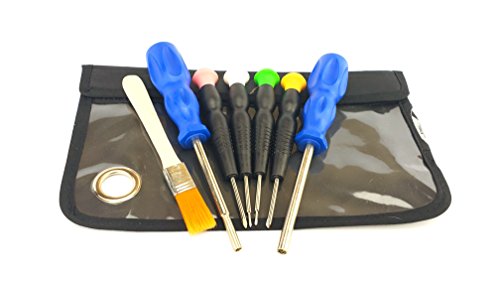
- Nintendo DS cartridge cleaning kit
- DS game cartridge cleaning kit with cleaning swabs
- electronic contact cleaner for DS cartridge pins
- isopropyl alcohol wipes electronics 99% for game cartridge cleaning
- Nintendo DS game cartridge pin cleaner tool


Before You Start
Prepare a clean, well-lit workspace and ensure the DS system is powered off. Remove the cartridge from the console before cleaning. Do not use water or household cleaners directly on the cartridge pins. Work slowly to avoid bending the metal contacts. Allow any cleaned components to dry completely before reinsertion, typically a few minutes for wipes or swabs and longer for liquid cleaners. If a cartridge shows visible cracks or damage, stop and replace it, as attempting to clean a damaged cartridge can worsen the problem.
Step-By-Step: How To Clean DS Cartridges
- Remove the cartridge from the DS console and inspect the gold pins for corrosion, residue, or bending.
- Use a dry cloth or lint-free swab to gently wipe the outer plastic surface, removing dust and oils.
- Dip a cleaning swab into isopropyl alcohol (preferably 90%+), then squeeze out excess liquid to keep the swab barely damp.
- Gently rub the metal contacts and edge connector in a straight, back-and-forth motion. Do not rotate the cartridge while cleaning the pins.
- Allow the pins to air-dry for a few minutes. If using a dedicated electronic contact cleaner, apply according to the product instructions and avoid oversaturation.
- For stubborn grime, use a Nintendo DS cartridge pin cleaner tool to lift debris from between contact pins—follow the tool’s guidance for safe use.
- Reinspect the pins. If they appear clean and dry, reinsert the cartridge into the DS and power on to test.
- If issues persist, repeat the cleaning process with a fresh swab and a light touch, ensuring no excess liquid remains that could seep into the console.
- Store cleaned cartridges in a clean case away from dust to prolong contact quality between cleanings.
- Keep a routine: periodically wipe the cartridge exterior and inspect pins to prevent buildup that affects performance.
- When cleaning multiple cartridges, label them to track which ones were cleaned recently and which may need deeper inspection later.
Troubleshooting
| Symptom | Likely Cause | Fix | Prevention |
|---|---|---|---|
| Game won’t start or loads slowly | Dirty contacts | Clean pins with isopropyl wipes or cleaning kit | Wipe after handling; avoid touching contacts |
| Cartridge not detected by DS | Corrosion or residue | Clean with cleaning swabs and alcohol; inspect for damage | Store in protective case; clean periodically |
| Intermittent power loss or fit issues | Bent or damaged pins | Use pin cleaner tool carefully; replace cartridge if bent | Handle gently; insert straight into slot |
| Rubbing/scratching noises during insertion | Debris on pins | Clean thoroughly; check for foreign particles | Keep workspace dust-free |
Common Mistakes
- Using excess liquid or spraying cleaner directly onto the cartridge
- Scrubbing pins aggressively, which can bend or wear contacts
- Cleaning only the exterior while neglecting the edge connector
- Reusing contaminated swabs without cleaning them first
- Cleaning damaged cartridges; replace damaged units instead
Tips For Best Results
- Opt for high-purity isopropyl alcohol (90% or higher) to reduce moisture exposure.
- Always allow dry time after applying cleaner to prevent short-circuits.
- Keep a dedicated, soft storage pouch for DS cartridges to minimize surface grime.
- Test a cleaned cartridge in a non-critical console first to confirm success.
- When using a cleaning kit, follow the manufacturer’s instructions for best results.
Call A Professional
Seek professional help if the cartridge shows visible cracks, severe corrosion, or the DS still cannot read the cartridge after multiple cleanings. Do not attempt invasive repairs on damaged components, and avoid forcing cartridges into a slot, which can cause further harm.
FAQ
Can I use water to clean a DS cartridge?
No. Water can damage the PCB and pins. Use isopropyl alcohol or a dedicated cleaning kit instead.
How often should I clean DS cartridges?
Clean only as needed when read errors occur or before playback after heavy handling or exposure to dust.
Is it safe to reinsert a cleaned cartridge immediately?
Yes, once the cartridge is completely dry and free of residual liquid.
Will cleaning affect warranty?
Cleaning with proper methods typically does not void warranty, but avoid attempting repairs beyond cleaning tasks.
Buying Guide
When selecting cleaning tools for DS cartridges, consider size compatibility, ease of use, and safety features. A basic kit with cleaning swabs, a dedicated pin cleaner, and a safe-contact cleaner provides a balanced option for regular maintenance. Look for alcohol wipes with high purity to minimize residue. A compact kit is ideal for travel or on-the-go maintenance. Noise level is not a major factor here, but compact, hand-held designs are often the most convenient. Energy efficiency is not a primary concern for cleaning tools, but efficient packaging and long-lasting swabs save replacements. Place cleaning supplies in a dry, cool area away from direct sunlight to preserve effectiveness. If choosing multiple products, prioritize a bundle that includes a DS cartridge cleaning kit, swabs, and a pin cleaner tool for comprehensive care. Do you prefer a single, all-in-one kit or separate components you already own? Consider your typical usage, the number of cartridges, and storage space to guide the best choice. Always verify product compatibility with Nintendo DS cartridges before purchasing.