Maintaining clean electric hair clippers is essential for performance, hygiene, and the longevity of blades. Regular cleaning not only prevents buildup but also helps prevent skin irritation for clients. This guide provides practical, step-by-step instructions tailored for American users, with simple tools and safe practices.
Whether you’re a professional barber or a home user, the right cleaning routine keeps clippers running smoothly between services and reduces the need for blade replacements. The following sections cover the basics, tools, and common issues to address during routine maintenance.
Quick Answer
Fast method: power off, remove blades, brush loose hair, spray cleaner or alcohol solution, wipe clean, oil the blades, reassemble, and test. For routine sanitization, use a dedicated clipper sanitizer spray and cleaning brush set between clients.
What You’ll Need
- Electric hair clipper cleaning brush with blade oil kit
- Hair clipper cleaning spray 70% isopropyl alcohol 8 oz
- Clipper blade cleaning kit with brush and oil
- Professional clipper sanitizer spray and cleaning brush set
- Barber clippers cleaning wipes and brush set
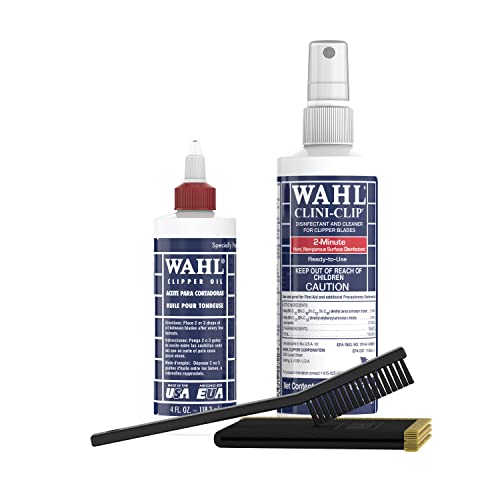 |
WAHL Professional Animal Blade and Clipper Maintenance Kit (03777) | |
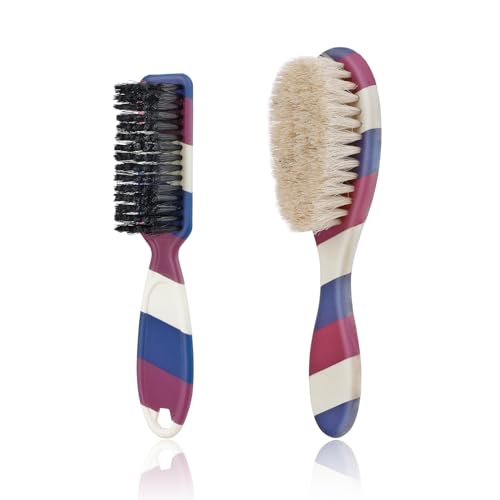 |
2 Pieces Barber Blade Cleaning Brush Set, Barber Clipper Brush Barber Fading Brush Neck Duster for Hair Cutting (Set-A) |
Before You Start
Prepare a clean, well-lit workspace with a sturdy surface. Ensure clippers are powered off and unplugged before disassembly. Keep a small tray or towel to catch loose hair. Never submerge electrical components in liquid, and avoid contact with the motor housing. For sanitization, use a product labeled safe for consumer electronics and follow the manufacturer’s directions. Expect a cleaning session to take about 5–15 minutes per unit, depending on how dirty the blades are.
Step-By-Step: How To Clean Clippers
- Power off and unplug the clipper; remove the blade assembly according to the manufacturer’s instructions.
- Use the included cleaning brush to remove hair and debris from the blade teeth, the blade holder, and the casing. Pay special attention to the gaps near the blade clamps.
- Apply the clipper blade cleaning spray or a 70% isopropyl alcohol solution to a lint-free cloth or a soft brush, and wipe the blade surfaces until they look clean and free of residue.
- Wipe the interior of the blade guard and around the motor housing with a damp, alcohol-dampened cloth if permitted by the manual; avoid soaking electrical parts.
- Reinstall the blade assembly and apply a drop or two of blade oil along the blade teeth. Hold the clipper running briefly to distribute the oil evenly.
- For deeper sanitization between clients, use a professional clipper sanitizer spray or a dedicated wipe kit to sanitize surfaces and blades without dampening electronics.
- Wipe down the exterior of the clipper with a clean, slightly damp cloth. Dry all surfaces before storage or next use.
- Store blades and tools in a clean, dry container. Inspect blades for wear; replace dull blades to maintain cutting efficiency and safety.
- Document a simple maintenance log to track cleaning frequency and blade oiling intervals, especially in professional settings.
- Repeat the process after every few uses or as needed during busy days to maintain peak performance and hygiene.
- If you notice unusual heat, excessive noise, or poor cutting performance, stop using the unit and consult a professional technician.
- For homes with multiple users, consider a dedicated sanitation station and portable wipe kits to streamline processes between sessions.
Troubleshooting
| Symptom | Likely Cause | Fix | Prevention |
|---|---|---|---|
| Blades drag or pull | Dull blades or improper alignment | Sharpen or replace blades; re-align according to manual | Regularly oil and inspect blades |
| Clippers overheat | Heavy buildup or wrong oil | Clean thoroughly; use recommended oil and avoid over-oiling | Clean after every few uses, use only approved lubricants |
| Streaky or uneven cut | Dirty blades or misadjusted gaps | Clean, align blade gaps, re-oil | Daily quick clean before and after use |
| Moisture inside housing | Excess liquid exposure | Dry immediately; disconnect power; consult service | Avoid soaking; use protective covers |
| Water or cleaner causing corrosion | Harsh chemicals or improper storage | Switch to milder sanitizers; store dry | Use pH-balanced cleaners; dry after cleaning |
Common Mistakes
- Not unplugging the unit before cleaning, risking shock or damage
- Submerging blades or motor components in liquid
- Using the wrong oil or excessive lubrication
- Skipping blade alignment checks after reassembly
- Neglecting routine sanitization between clients
Tips For Best Results
- Seal blade gaps properly after reinstalling to prevent snagging
- Use a dedicated clipper cleaning spray to minimize residue buildup
- Keep a labeled spray bottle filled with alcohol or sanitizer for quick touch-ups
- Store clippers in a dry, dust-free environment to extend blade life
Call A Professional
Consider a professional service if you notice persistent overheating, unusual electrical smells, or if the unit fails to power on after cleaning. Stop using the device and seek help from an authorized technician when:
- The clipper no longer powers up under normal load
- There are visible signs of damaged wiring or detached components
- Blades are chipped or severely worn beyond safe replacement
FAQ
How often should I clean my clippers?
Clean after each use, with a deeper clean at least weekly for professional settings.
What cleaning products are safe for clippers?
Use products labeled for clipper use, such as clipper cleaning spray, 70% isopropyl alcohol, and blade oils recommended by the manufacturer.
Can I soak clippers in water?
No. Do not submerge clippers; only wipe exterior surfaces and follow manufacturer guidance for interior cleaning.
Is blade oil necessary every time I clean?
Yes. A light application of blade oil reduces friction and extends blade life between more thorough maintenance sessions.
What should I do if blades rust?
Replace rusted blades and sanitize the rest; avoid using corroded blades on clients.
Do cleaning wipes replace spray?
Wipes are convenient for quick sanitizing between uses, but sprays often provide deeper cleaning and faster drying.
Buying Guide
Choosing the right cleaning tools and sanitizers can impact both performance and hygiene. When comparing products, consider size, ease of use, and compatibility with your clipper model. Look for alcohol-based sanitizers with quick-dry formulas and non-corrosive blade oils. The following factors help narrow choices:
- Size and format: A compact spray bottle or wipe kit fits small workspaces; larger kits suit high-volume barbershops.
- Noise level: Cleaning products should not affect the clipper’s operation; use gentle, non-abrasive cleaners.
- Energy efficiency: Not directly applicable to cleaners, but choosing low-residue products reduces the need for frequent cleaning cycles.
- Controls and compatibility: Select products proven safe for shared equipment and compatible with your blade type and coatings.
- Placement: Create a dedicated sanitation station near the workstation to streamline workflows.
- Cost and value: Compare bundles that include both brush sets and oils versus single-item purchases for long-term savings.
- Brand and safety: Prefer reputable brands with clear usage directions and safety data sheets.
Users should balance practicality and hygiene. A well-equipped kit with a cleaning brush, blade oil, sanitizer spray, and wipes supports efficient maintenance without slowing down client flow. If storage space is limited, select multi-function kits that cover cleaning, oiling, and sanitization in one package.