Cracked screens are a common frustration for many smartphone users. This guide provides a clear, practical approach to addressing minor cracks and evaluating when professional help is needed. It emphasizes safe handling, suitable tools, and efficient steps to restore usability without risking further damage.
Quick Answer
Assess the damage: if the touch function remains responsive and the crack is only superficial, a DIY repair is often feasible. For deeper cracks, glass shards, or suspected LCD damage, consider professional service. Always power off the device before starting and use protective gear.
What You’ll Need
- iPhone screen replacement kit with adhesive tape and pry tools
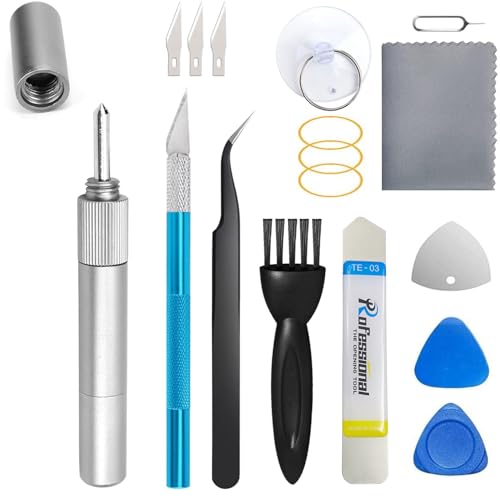
- Android smartphone screen repair toolkit suction cup spudger
- DIY phone screen repair kit with glass separator and glue
- Tempered glass screen replacement tool kit for smartphones
- Professional phone screen repair kit with heat gun and repair jig

Before You Start
Before attempting any screen repair, ensure you have a clean, well-lit workspace and a soft surface to prevent further damage. Power off the device completely and disconnect any accessories. Keep small parts away from children and pets. If you have any of the following, stop and seek professional help: a damaged battery, moisture exposure, or cracks extending into the display area that affect visibility.
Time estimate: 60–120 minutes for a basic screen swap on many models; longer if you must replace additional components. Have patience, follow instructions precisely, and avoid forcing components apart. If you’re unsure about cable connections or adhesive application, opt for professional service to prevent secondary damage.
Step-By-Step: How To Fix Cracked Phone Screens
- Power down the phone and remove any protective case and SIM tray to prevent damage during disassembly.
- Use a heat source carefully (when appropriate) to soften adhesive around the screen edge. This helps lift the display without tearing cables.
- Gently insert a pry tool or plastic opening pick under the edge of the screen and run it around the frame to release adhesive, avoiding the ribbon cables.
- Detach the battery connector first when accessible, then gradually release the display connectors using a spudger. Keep track of each cable’s location for reassembly.
- Clean the frame and contact surfaces to remove old adhesive residue. If using a glass separator, follow the kit instructions to separate glass pieces safely.
- Apply the new adhesive or double-sided tape precisely around the frame. Align the replacement screen and press evenly to seat it.
- Reconnect all cables in the reverse order of disassembly, then power on to test touch response, display quality, and any cameras or sensors.
- If the screen shows lines, dead pixels, or touch issues, revisit cable connections and reseat connectors. If problems persist, consider a professional assessment.
- Install a tempered glass screen protector to reduce future impact and protect the new display from micro-cracks.
- Reassemble the device case and test all functions again, including speaker, microphone, and charging.
- Dispose of replaced parts responsibly and store spare adhesives and tools for future use.
Troubleshooting
| Symptom | Likely Cause | Fix | Prevention |
|---|---|---|---|
| Display not turning on | Loose battery or display connector | Reconnect cables securely and reseat battery | Handle connectors gently during disassembly |
| Touch screen unresponsive | Cable misalignment or damage | Reopen and reseat touch connectors | Use proper tools and avoid bending cables |
| Backlight flicker or uneven lighting | LCD/OLED damage or poor adhesive seal | Replace screen assembly or reseal properly | Work in clean area; apply even pressure |
| Persistent cracks after replacement | Glass shards not fully removed | Carefully remove debris and reseal | Follow kit steps precisely, don’t rush |
Common Mistakes
- Using excessive force when prying; it can crack internal components or cables.
- Skipping steps or misaligning connectors during reassembly.
- Not protecting moisture or dust during repair; seal gaps after replacement.
- Ignoring battery safety; a swollen or damaged battery requires pro handling.
Tips For Best Results
- Choose a repair kit that matches your model, whether iPhone, Android, or another device.
- Work in a static-free environment and keep a magnetic mat for small parts.
- Test the device progressively during reassembly to catch issues early.
- Consider a tempered glass protector to guard against future cracks.
- Document cable routing with photos before disassembly to simplify reassembly.
Call A Professional
Seek professional help if you notice any of these signs: the device won’t power on after replacement, battery or charger issues persist, the display bulges or shows heat, or there is water exposure. Complex LCD or entire frame replacement often requires specialized equipment and calibration that goes beyond consumer repair kits.
FAQ
Can I fix cracked screens myself?
Yes, for non-bleeding, small cracks on a responsive touchscreen, DIY kits can work with careful steps.
What tools are essential for screen repairs?
Essential tools include pry tools, a suction cup, spudger, adhesive, and a compatible replacement screen.
Will DIY repairs void my warranty?
DIY repairs may void remaining warranty or protection plans; check manufacturer terms before proceeding.
Is a cracked screen dangerous?
Cracks can cause sharp edges and compromise water resistance; handle with care and avoid using damaged devices for long periods.
Buying Guide
When selecting a screen repair approach, consider the device model, availability of replacement parts, and your comfort level with DIY projects. Key buying factors include size compatibility, noise level from tools, energy and heat control, and ease of use. Compare kits based on whether they include adhesive, glass separator, or a heat gun, and evaluate whether a repair jig might simplify alignment for a precise fit. Placement matters too; ensure you have a clean, well-lit workspace and a comfortable height to reduce fatigue during a longer repair session. For many users, a mid-range kit that includes a full set of pry tools, suction cup, and adhesive offers the best balance between cost and reliability. If you anticipate multiple repairs across devices, investing in a professional-grade kit with a heat gun and jig can save time and reduce risk in the long run.