Phone ports—like the Lightning or USB-C connectors—collect dust, lint, and debris that can affect charging and data transfer. The following, practical guide explains how to clean ports without damaging sensitive components, using common tools designed for phones and electronics. It emphasizes safety, proper technique, and maintenance habits to keep devices performing at their best.
Quick Answer
Power off the device, unplug all cables, and use a gentle approach with non-metal tools to remove debris. Start with a soft brush or lint-free swab, then use a dry air blower if needed. Avoid liquids and excessive force. If debris persists, switch to a purpose-designed cleaning tool kit and seek professional help for stubborn buildup.
What You’ll Need
- iPhone Lightning port cleaning brush
- USB-C port cleaning tool kit
- electronic air blower dust remover
- anti-static precision cleaning brush for smartphone ports
- lint-free microfiber swab set for phone ports


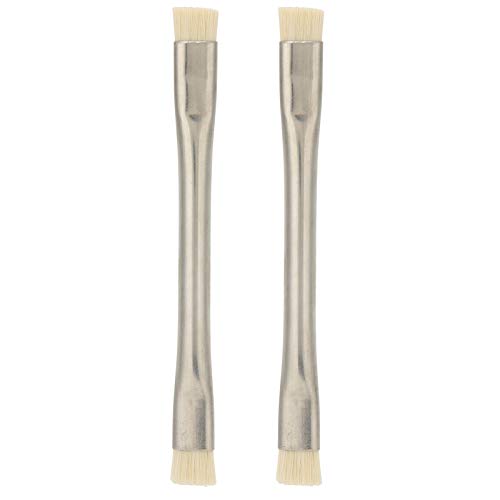
Before You Start
Ensure the device is powered down and disconnected from any power source. Work in a clean, well-lit area to avoid losing small parts. Use static-free tools to minimize the risk of electrostatic discharge. Time estimate: 5–15 minutes for each port. Never insert metal objects, liquids, or excessive force into the port. If the device is under warranty or you’re unsure, consider professional servicing instead of DIY cleaning.
Step-By-Step: How To Clean Phone Ports Safely
- Power off and unplug any cables to prevent short circuits during cleaning.
- Inspect the port with good lighting to identify visible debris and lint.
- Gently insert a lint-free microfiber swab or anti-static precision cleaning brush into the port and roll to pick up lint.
- Use a iPhone Lightning port cleaning brush or USB-C port cleaning tool kit tool for targeted debris removal along the port edges.
- For stubborn dust, employ a electronic air blower dust remover at a safe distance and short bursts to dislodge particles.
- Repeat sweeping motions with a fresh swab or brush until the port appears clean and free of obstruction.
- Check both sides of the connector to confirm no lint remains near the metal contacts.
- Test the port by reconnecting a cable or accessory and gently wiggling to ensure a stable connection without resistance.
Troubleshooting
| Symptom | Likely Cause | Fix | Prevention |
|---|---|---|---|
| Charging slows or stops intermittently | Lint or dust lodged in the port | Re-clean with non-metal tools; use air blower in short bursts | Regular light cleanings; avoid eating over devices |
| Connector feels sticky or damaged | Residual liquids or corrosion | Do not apply liquids; seek professional service | Keep ports dry; use case with breathability |
| Data transfer fails | Dust blockage or bent contacts | Clean port; inspect for bent pins; don’t force connectors | Store device away from dust-prone areas |
| No improvement after cleaning | Deep-seated debris or hardware issue | Consult a technician | Avoid repeated aggressive probing |
Common Mistakes
- Using metal tools or pins that can damage connectors.
- Applying liquids or solvents near exposed electronics.
- Forcing cables when the port feels tight.
- Rushing cleaning without inspecting for loose debris after each pass.
- Cleaning while the device is on or connected to power.
Adopting a careful routine helps extend port life and keeps charging from becoming problematic.
Tips For Best Results
- Work in a clean, well-lit space and keep track of tiny components with a tray or mat.
- Use static-free tools designed for electronics to minimize electrostatic discharge risk.
- Perform routine, light cleanings every few months rather than waiting for issues to arise.
- Rotate tools between uses to avoid cross-contamination of debris between ports.
- When in doubt, start with the softer brush and progress to targeted tools only as needed.
Call A Professional
Consider professional help if any of the following apply: visible corrosion, debris deeply lodged in the connector, or if the port remains non-functional after cleaning attempts. Signs that indicate a pro are persistent charging failures, screen messages about power, or devices that heat excessively during charging. If the device is under warranty, check coverage before attempting internal cleaning, as improper handling may void terms.
FAQ
Can I use water to clean a phone port?
No. Liquids can seep into the device and cause damage. Use dry tools only.
How often should I clean my phone ports?
Light cleaning every few months is usually sufficient, more often if you frequently use the device in dusty environments.
What tools are safest for cleaning phone ports?
Dedicated cleaning brushes, lint-free swabs, and electronic air blowers designed for electronics are safest options.
Is it okay to clean the charging port while the device is charging?
Never clean a port while it is charging or connected to power.
Buying Guide
When choosing cleaning tools for phone ports, consider size, ease of use, and compatibility with your device type. Key buying factors include:
- Port compatibility – Ensure tools fit both Lightning and USB-C ports or match your device family.
- Tool variety – A kit with brushes, swabs, and an air blower offers flexibility for different debris types.
- Material quality – Look for anti-static, lint-free materials to reduce residue and static risk.
- Ease of use – Ergonomic handles and compact designs improve maneuverability in tight ports.
- Port accessibility – Some kits include angled brushes or retractable tips for hard-to-reach areas.
For most users, a balanced kit with a cleaning brush, microfiber swabs, and an electronic air blower provides the best value and effectiveness. Consider your typical environment—dusty offices or outdoors—when selecting tools. Do you prefer a single comprehensive kit or modular pieces you can upgrade over time? Keeping a dedicated cleaning set on hand helps maintain charging reliability and overall device health.