Maintaining clean earphones not only improves sound quality but also extends their lifespan and helps prevent skin irritation. This practical guide covers safe methods and tools to remove ear wax and debris from earbuds, while protecting delicate components.
The following steps focus on common consumer devices and use readily available cleaning tools. Readers should follow manufacturer guidance for their specific model if available, and avoid harsh chemicals or excessive moisture.
Quick Answer
Use a gentle cleaning routine: power off devices, remove detachable parts if possible, wipe surfaces with a microfiber cloth, and carefully dislodge debris with a soft brush or silicone pick. Finish with gentle swabs moistened sparingly with isopropyl alcohol (at 70% or less) on hard surfaces only. Avoid liquid ingress into drivers or housings.
What You’ll Need
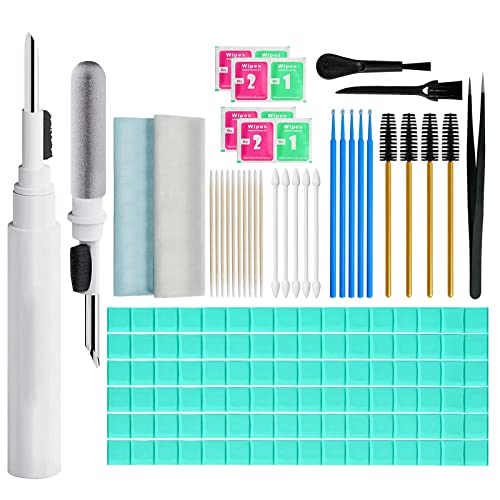
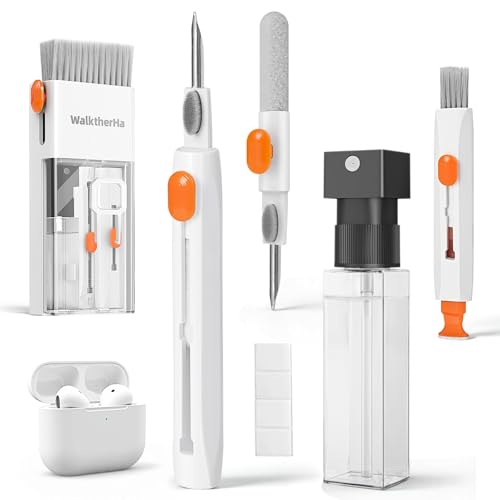
- earbud cleaning kit with soft brush and silicone pick
- 3-in-1 earphone cleaning tool set with brush, pick, and microfiber cloth
- electronic cleaning swabs for headphones and earbuds
- microfiber cleaning cloth for headphones and earphones
- earbud jack cleaning tool kit

Before You Start
Prepare a clean, well-lit workspace. Power off all devices and disconnect from any audio sources. If your earbuds are water-resistant, check the rating and avoid saturating openings. Work slowly to prevent pushing debris deeper into the housings. Critical cautions: never submerge the earphones, avoid excessive moisture near exposed drivers, and do not insert metal objects into the nozzle or mesh.
Estimated time: 5–15 minutes depending on level of buildup. For sensitive or expensive models, consider professional service if you are unsure about disassembly or risk of damage.
Step-By-Step: How To Clean Earphones From Ear Wax
- Power off and unplug any connected devices. Detach removable tips or cushions if the model allows for easier access.
- Gently wipe the exterior surface with a dry microfiber cloth to remove loose dust and oils.
- Use the soft brush from the cleaning kit to brush across the mesh in a short, light strokes, rotating around the grille to lift wax buildup.
- For stubborn wax, carefully employ the silicone pick to lift debris from the outer edges without poking into the driver. Keep the pick almost flat to avoid damage.
- Dip an electronic cleaning swab in isopropyl alcohol (70% or lower) and squeeze out excess liquid. Gently wipe the outer surfaces; avoid dripping condensation into any openings.
- If needed, use a microfiber cleaning cloth to buff the exterior and recheck for remaining wax along seams and edges.
- Reconnect detachable parts and test audio at a low volume to ensure no residue remains in the grille. Repeat only if necessary and with caution.
- After cleaning, store tools in the original case or a dedicated pouch to prevent contamination and damage.
- For wireless buds with charging contacts, avoid moisture on contact surfaces and use a dry cloth to wipe the charging pads after cleaning.
- Run a quick audio test with a familiar track to verify clear sound and absence of crackling or distortion.
- Regular maintenance every few weeks can prevent heavy buildup and extend the life of the devices.
Troubleshooting
| Symptom | Likely Cause | Fix | Prevention |
|---|---|---|---|
| Audible crackling after cleaning | Residue left in grille or moisture | Re-clean with dry brush, then wipe with minimal moisture | Use minimal liquid; avoid soaking |
| No sound in one earbud | Debris blocked the nozzle | Re-inspect and gently clear with silicone pick | Clean regularly to prevent buildup |
| Wax buildup returns quickly | Repeated contact with ear canal oils | Wipe surfaces after use; consider silicone ear tips | Use detachable tips and store properly |
| Moisture visible inside mesh | Excess cleaning liquid used | Let air dry completely before reuse | Moisture control during cleaning |
Common Mistakes
- Using metal tools to scrape the mesh—causes permanent damage.
- Applying too much liquid; moisture can seep into drivers.
- Ignoring exterior cleaning, which leads to wax migration inside the housing.
- Forgetting to reassemble properly, which affects fit and sound quality.
Tips For Best Results
- Clean on a well-lit surface to spot hidden debris quickly.
- Grasp detachable cushions and tips gently to avoid tearing or deformation.
- Perform a routine clean every few weeks, especially for frequent earbud users.
- Choose tools with soft bristles and non-metal tips to minimize risk.
- Store cleaning tools in a dedicated case to keep them sanitary and ready.
Call A Professional
Seek professional service if you notice:
- Persistent crackling or loss of volume that persists after cleaning.
- Visible damage to the mesh, drivers, or wiring.
- Water intrusion or suspected liquid damage.
- Difficulty disassembling components without clear instructions.
FAQ
Can I use alcohol wipes on wireless earbuds?
Yes, but use them sparingly and avoid soaking the openings. Wipe only exterior surfaces.
Is it safe to use a cotton swab on earphone mesh?
Prefer a microfiber cloth or soft brush; cotton swabs can shed fibers and push debris deeper.
How often should I clean my earphones?
Clean after every noticeable buildup or at least every few weeks for regular users.
What should I avoid when cleaning?
Avoid submerging devices, applying strong solvents, or forcing debris into the nozzle.
Buying Guide
Choosing the right cleaning kit depends on your earbuds and personal habits. Consider size and portability for travel-friendly kits, and ensure brushes, picks, and cloths are non-abrasive. Look for anti-static materials to prevent dust attraction. For households with multiple devices, a kit that includes different tools can cover all models.
Key buying factors include:
- <bSize and compatibility: Ensure the tools fit your earbud shapes without causing stress on delicate housings.
- <bNoise considerations: Cleaning tools generate minimal noise; quieter brushes are preferable for shared spaces.
- <bEnergy efficiency: Not directly applicable, but compact cleaning sets benefit from battery-free, manual tools.
- <bControls: Not applicable; however, consider tools with clear caps or tips to prevent over-insertion.
- <bPlacement and storage: A case or pouch helps keep tools organized and reduces cross-contamination.
Thinking about a multi-tool option? The 3-in-1 earphone cleaning tool set and the earbud cleaning kit with soft brush and silicone pick offer versatility for different device designs. For stubborn debris, the electronic cleaning swabs provide controlled moisture delivery, while a microfiber cloth delivers a gentle finish. If cleaning across multiple devices matters, the earbud jack cleaning tool kit can cover ports and jacks efficiently.