The Dirt Devil vacuum line includes several filter options that help maintain suction and improve indoor air quality. Regular cleaning and timely replacement of filters can extend the life of the vacuum and keep it running at peak efficiency. This guide covers practical steps to clean dirt and debris from vacuum filters, plus when to refresh components for best results.
Quick Answer
To optimize suction, start by removing the filter, tapping out loose dirt, and rinsing non-HEPA filters under cool water. Let filters air-dry completely before reinstalling. For HEPA or specialty filters, check manufacturer recommendations; some models require replacement rather than washing. Keep the dust cup and exhaust areas clean to reduce buildup and maintain airflow.
What You’ll Need
- Dirt Devil replacement vacuum filter kit
- Dirt Devil upright vacuum HEPA filter
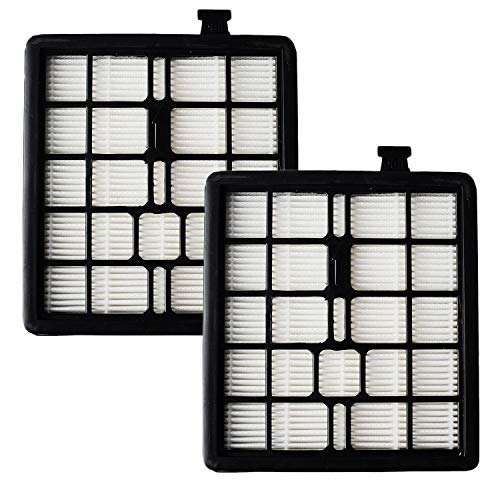
- Dirt Devil 2-pack vacuum filters
- Dirt Devil vacuum filter cleaning brush
- Dirt Devil dust cup exhaust filter replacement


Before You Start
Before disassembling the vacuum, unplug the unit and empty the dust cup to reduce dust exposure. Work in a well-ventilated area and avoid using hot water on non-heat-tolerant filters. Allow washed filters to dry completely—this can take up to 24 hours in a warm, dry environment. Safety note: never wash a HEPA or sealed vacuum filter if the model specifies replacement only; improper cleaning can damage the filter and void warranties.
Step-By-Step: How To Clean Dirt Devil Vacuum Filters
- Power off the vacuum and unplug it, then remove the dust cup to access the filter assembly.
- Gently tap the filter over a trash can to dislodge loose dirt and debris.
- If the filter is labeled as washable, rinse it under cool running water until the water runs clear. Do not use hot water or detergents unless specified.
- Shake excess water from the filter and place it in a clean, dry area to air dry completely. Do not use a dryer or direct heat.
- Inspect the dust cup exhaust filter area for clogs and wipe with a dry cloth or brush to remove stubborn dust.
- Reinstall the dry filter and dust cup, then run the vacuum briefly to ensure proper seating and no leaks.
- For non-washable or HEPA filters, replace them with a fresh Dirt Devil replacement vacuum filter kit or Dirt Devil 2-pack vacuum filters as recommended by the model.
- Record the maintenance date and set a reminder for the next cleaning or replacement interval based on usage and floor types.
- Use the Dirt Devil vacuum filter cleaning brush to remove deeply embedded debris from crevices and seals during routine maintenance.
- If suction remains weak after cleaning, inspect the brush roll, hose, and filter housing for blockages and clear them as needed.
- For persistent issues, consult the Troubleshooting guide or contact support as needed.
Troubleshooting
| Symptom | Likely Cause | Fix | Prevention |
|---|---|---|---|
| Reduced suction after cleaning | Clogged or improperly seated filter | Reseat or replace filter; ensure it is fully dry before reinstallation | Regularly inspect and clean filters as scheduled |
| Dust escaping from vacuum exhaust | Damaged filter or incorrect installation | Replace with Dirt Devil replacement filter kit; reinstall correctly | Handle filters gently during maintenance |
| Unusual noise or vibration | Blockages in ductwork or dust cup | Clear pathways, empty cup, and recheck seals | Avoid overfilling dust cup |
| Filter shows visible wear | Age and heavy use | Replace with a fresh Dirt Devil 2-pack vacuum filters | Schedule timely replacements |
Common Mistakes
- Using hot water or detergents on filters not rated as washable
- Installing a damp filter, which can mold and reduce suction
- Neglecting to clean the dust cup exhaust area leading to bottlenecks
- Forgetting to check non-washable HEPA filters for replacement rather than cleaning
Tips For Best Results
- Keep spare replacement filters on hand to minimize downtime during maintenance cycles.
- Label each filter with the date of installation to track performance over time.
- Use the included cleaning brush to remove embedded debris from tight spaces around the filter housing.
- During heavy cleaning seasons, inspect filters more frequently and replace as needed.
Call A Professional
Some issues require professional assistance. If the vacuum loses suction after all filter maintenance, or if there are electrical or motor concerns, contact a certified service technician. Stop using the unit if you notice burning smells, unusual heat, or exposed wiring, and consult customer support or an authorized repair center.
FAQ
How often should I clean Dirt Devil filters?
Schedule a basic clean every 1–3 months depending on usage; replace HEPA or specialty filters per manufacturer guidance.
Can I wash all Dirt Devil filters?
No. Only filters labeled as washable should be cleaned with water. Non-washable filters require replacement.
What is the difference between replacement filter kits and 2-pack filters?
Replacement filter kits provide a complete set for multiple maintenance cycles, while 2-pack filters offer convenience for quick replacements when needed.
Where should I store spare Dirt Devil filters?
Keep them in a cool, dry place away from direct sunlight to preserve material integrity.
Is cleaning the filter enough to restore suction?
Often yes, but check for clogs in the dust cup, hose, and motor housing if suction remains weak.
Do HEPA filters require special care?
Yes. Follow the model’s guidance; many HEPA filters are not washable and must be replaced when dirty.
Buying Guide
When choosing replacement components or a maintenance plan for a Dirt Devil vacuum, consider several factors that influence performance and cost. Size and compatibility ensure the filters fit your specific model. Noise level, though secondary to filtration, can affect comfort during use. Energy efficiency and airflow rely on clean filters and unobstructed exhaust paths. Controls should be intuitive, with clear indicators for filter replacement or maintenance. Placement of the vacuum and storage for replacement parts affects convenience and longevity. Compare kit contents, availability of 2-pack options, and the compatibility of a HEPA filter with your model. A well-timed filter replacement strategy reduces long-term maintenance and preserves indoor air quality while keeping your cleaning routine smooth and efficient. Are you ready to assemble a dependable maintenance plan that fits your household needs?