Stringing is a common nuisance in 3D printing, where thin strands of filament appear between separate parts of a print. It often results from temperature, retraction, or travel path settings that allow molten plastic to ooze out. This article provides practical, step-by-step methods to minimize or eliminate stringing, using commonly available tools and setup adjustments.
Quick Answer
Retraction tuning and temperature control are the two most impactful changes. Start by lowering the printing temperature by 5–10°C in small increments and increasing retraction distance and speed modestly. If stringing persists, check for nozzle and hotend cleanliness. Use a dedicated cleaning kit to remove residue and recalibrate your printer for optimal results.
What You’ll Need
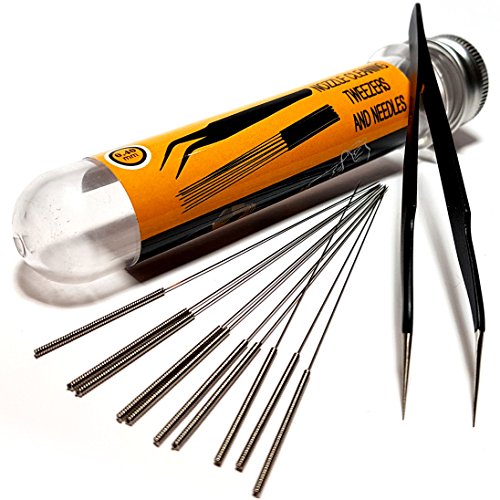
- 3D printer nozzle cleaning kit
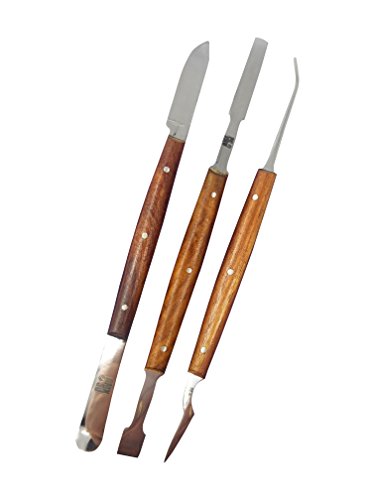
- 3D printer hotend cleaning tool set
- Filament stringing prevention tools for 3D printing
- 3D printer anti-stringing temperature gauge
- 3D printing retraction tuning tool

Before You Start
Before attempting stringing remedies, ensure the printer is on a level, stable surface and the build plate is properly calibrated. Have a baseline test print ready to compare results. Safety first: allow hot components to cool before handling, and never force tools into the hotend. Time estimates vary by model and settings, but a thorough test and adjustment cycle typically takes 1–2 hours spread across a few print attempts.
Step-By-Step: How To Get Rid Of Stringing In 3D Printing
- Run a baseline stringing test, such as a simple bridge or retraction test, to observe the current stringing behavior.
- Lower the nozzle temperature in small increments (5°C steps) and print a representative test piece to gauge changes in stringing.
- Increase retraction distance gradually in small steps. If your printer supports coasting or wipe features, enable them and test again.
- Check for nozzle cleanliness using the 3D printer nozzle cleaning kit. Remove any burnt plastic or residue that can encourage oozing.
- Inspect the hotend for clogs or partial blockages with the 3D printer hotend cleaning tool set. A clean heat break helps prevent oozing during travel moves.
- Adjust travel path settings in your slicer to minimize unnecessary travel over open air and enable a non-print move with retraction.
- Experiment with cooling: if your material benefits from faster cooling, ensure the part cooling fan is correctly calibrated and not overcooling the filament in the nozzle.
- Test with a filament known for stable behavior. If stringing remains, repeat temperature and retraction adjustments while keeping a log of settings and results.
- Once stringing is minimized, run a final longer test print that includes multiple retractions and travel segments to confirm consistency.
- Document the effective combination of temperature, retraction, and travel settings for future prints with the same material and nozzle size.
- Store and maintain your cleaning tools to keep the nozzle and hotend in peak condition between prints.
Troubleshooting
| Symptom | Likely Cause | Fix | Prevention |
|---|---|---|---|
| Visible stringing between parts | Too high nozzle temperature or excessive ooze | Lower temperature; adjust retraction | Record temperature range for material |
| Strings only on certain layers | Inconsistent extrusion or temperature fluctuations | Check heater cartridge and thermistor; rerun PID tuning | Regular hotend maintenance |
| Strings with long travel moves | Insufficient retraction or poor travel optimization | Increase retraction distance/speed; modify slicer travel settings | Keep travel paths short and direct |
| Residue after cleaning | Partial blockage or old filament deposits | Clean nozzle thoroughly with proper tools | Clean between material changes |
Common Mistakes
- Raising temperature too much in pursuit of better flow, which worsens stringing.
- Over-retracting, leading to jams or gaps in prints.
- Ignoring cooling implications on different materials and geometries.
- Neglecting nozzle cleanliness, allowing residue to seed stringing.
Careful, incremental adjustments are more effective than large, sweeping changes. Keeping a log helps identify which changes yield reliable improvements over time.
Tips For Best Results
- Calibrate PID control for stable extrusion temperatures during long prints.
- Use a wipe or coast feature if your slicer supports it to reduce ooze at the end of moves.
- Keep replacement parts on hand, especially nozzles and PTFE tubes, to promptly address wear that can contribute to stringing.
- Test with multiple filaments to determine whether a given material responds better to temperature or retraction adjustments.
Call A Professional
If stringing persists despite systematic testing, consider consulting a professional service. Schedule a check if there is:
- Persistent clogs that resist cleaning
- Frequent hotend temp fluctuations not explained by firmware
- Unusual mechanical play or misaligned axes affecting movement
Timely professional attention can prevent extended downtime and reduce waste from failed prints.
FAQ
What is the fastest way to reduce stringing?
Lower the nozzle temperature in small steps and adjust retraction distance and speed while testing with a representative print.
Can repetitive cleaning improve stringing without changing settings?
Yes, regularly cleaning the nozzle and hotend can reduce residue that seeds stringing and improve extrusion consistency.
What role does filament play in stringing?
Different filaments have different flow characteristics; try a test with multiple filaments to identify the best match for your printer.
Should I enable cooling when addressing stringing?
Balanced cooling helps with some materials but can increase stringing if too strong near the nozzle. Adjust cooling alongside temperature and retraction tests.
Buying Guide
The right accessories and tools can significantly improve results when getting rid of stringing in 3D printing. Key buying factors include:
- <bNozzle cleaning kit: Essential for removing burnt plastic and keeping extrusion smooth. Look for sets that cover needle tools and abrasive cleaning sticks.
- <bHotend cleaning tool set: Helps dislodge clogs without damaging components. Choose a versatile range that fits common hotends.
- <bFilament stringing prevention tools: Tools like manual retractors, travel path optimizers, and coasting features can reduce ooze during moves.
- <bAnti-stringing temperature gauge: Accurate temperature readings help dial in safe, stable extrusion for various materials.
- <bRetraction tuning tool: Dedicated devices or software features that simplify dialing in retraction settings.
When comparing options, consider compatibility with your printer model, included accessories, and ease of use. For multi-material setups, ensure tools accommodate different hotend configurations. If space is limited, prioritize a compact cleaning kit and reliable retraction tuning tools. Always verify product warranties and user reviews to gauge real-world effectiveness.