If you’re searching for a projector to help you paint on canvas, this guide identifies top options that balance ease of use with accurate image tracing. These projectors are best for artists who want precise outlines, scalable image sizes, and minimal setup time. The highlighted models suit beginners who want simple tracing, hobby painters working on canvases, and crafters seeking a reliable tool for mural planning or large-format drawings. Below you’ll find five strong picks, each with clear reasons to choose and a practical caveat to consider.
Buying Quick View
| Product | Best For | Key Benefit |
|---|---|---|
| Caydo S1 LED Art Projector | Detailed tracing on small to medium canvases | Optical magnification 2.5X–11X, long LED life |
| RTSTEC Art Projector for Tracing | Phone-based projection for quick sketches | Mobile-friendly with iPhone/iPad compatibility |
| GIKUCNZL Drawing Projector | Multi-use projection for canvas and desktop | High resolution up to 1280×720 with 4K support |
| Caydo P1 Art Projector | Professional tracing with built-in app | Exclusive drawing app features and 4K-like capabilities |
| LAIZESKE HY520 Art Projector | Flexible, wireless projection for varied canvases | 720P with WiFi/Bluetooth for easy screen mirroring |
Caydo S1 LED Art Projector for Tracing
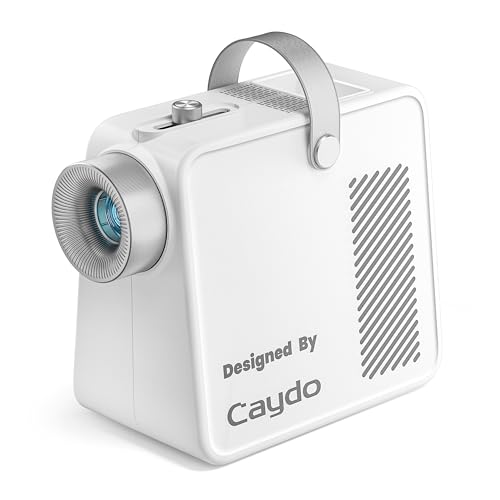
The Caydo S1 uses a pure optical magnification system to enlarge sketches or photos without relying on apps or wireless connections. Users place a 5″ x 5″ image under the unit and project from 2.5X to 11X onto walls or canvases as large as 80 inches. This makes it ideal for artists who want to trace detailed patterns, wall murals, or quilting templates. It features a 20,000-hour LED lamp, 5,000-lumen brightness, and a quiet cooling fan, which helps maintain focus during tracing. A smooth top knob lets you quickly shift from blurry to sharp projection. Best for beginners and intermediate crafters who want a straightforward, reliable tracing process without bulbs to replace.
- Best for: artists who want reliable optical enlargement with minimal upkeep.
- Why selected: long LED life, quiet operation, and precise focus control support fast, accurate tracing.
- Limitations: no built-in Bluetooth or WiFi; works strictly with physical originals under the lens.
RTSTEC Art Projector for Tracing

The RTSTEC projector emphasizes wireless and HDMI/USB inputs, enabling projection from iPhones and iPads via AirPlay-like functionality. It supports an adjustable focus lens with a projection distance range of 11 to 80 inches and a practical projection area from about 6″ x 10″ up to 60″ x 90″. It’s best for artists who routinely trace from a phone screen or Canva designs and want a compact device to work on desks or walls. It’s a suitable option for beginners who plan to project simple images and want quick setup.
- Best for: artists seeking phone-based or canva-derived tracing with straightforward setup.
- Why selected: clear image at closer distances; multiple input options simplify workflow.
- Limitations: not compatible with Android phone mirroring; designed primarily for iOS ecosystem mirroring.
GIKUCNZL Drawing Projector

This model positions itself as a versatile tool for tracing and projecting images onto canvases, desktops, or walls. It offers a maximum projection size suitable for painting projects on canvas, with high-resolution support and multiple connectivity options, including wireless mirroring for flexible device pairing. It’s best for artists who want a single projector that can function effectively for both sketching on paper and transferring onto larger canvases.
- Best for: multi-surface tracing, including canvases and desktops.
- Why selected: high-resolution display and broad connectivity suit varied creative setups.
- Limitations: some users may prioritize higher native resolution for very fine lines.
Caydo P1 Art Projector with Exclusive Drawing App

The P1 variant adds an exclusive drawing app designed for artists, with features including 4K-like output, 100″ display, and keystone correction. It emphasizes a seamless transfer of designs via QR code or USB drive and supports screen mirroring for entertainment or reference image display. This is a better pick for users who want advanced drawing tools integrated into the projector workflow. Best for professionals or serious hobbyists who value integrated software and robust visualization options.
- Best for: artists who want built-in drawing tools and flexible mirroring options.
- Why selected: integrated app features — zoom, rotation, grids — streamline tracing and composition.
- Limitations: advanced features require occasional app updates and setup effort.
LAIZESKE HY520 Art Projector

The HY520 emphasizes wireless convenience with 720P resolution and 200 ANSI lumens, plus 2.4G WiFi and Bluetooth for easy screen mirroring. It’s a compact option for artists who want a portable projector capable of projecting onto canvas or paper across small to medium sizes. If you want a budget-friendly, wireless-first setup, this model is a solid pick. Best for: budget-conscious crafters and hobby painters who need wireless projection with decent clarity.
- Best for: budget-friendly wireless projection for canvas or paper tracing.
- Why selected: compact and easy to move, with built-in wireless mirroring.
- Limitations: 720p resolution may be limiting for fine line tracing on very detailed canvases.
Buying Guide: Key Considerations For Canvas Painting Projections
How to choose a projector for painting on canvas depends on image size, accuracy, and ease of use. Consider the following factors when comparing models:
- Projection size and distance: Does the unit meet your canvas dimensions from your typical workspace?
- Resolution and sharpness: Is the image crisp enough to trace fine lines without distortion?
- Input options: Do you work from a phone, tablet, computer, or printed templates?
- Ease of use: Is there a straightforward focus mechanism and minimal setup time?
- Software features: Are built-in apps or screen mirroring beneficial for your workflow?
- Portability: Will you move the projector between rooms or setups?
- Durability and noise: Does the device run quietly and reliably during long tracing sessions?
Practical Tips For Using a Projector On Canvas
- Prepare your canvas with a flat, clean surface to ensure sharp projection.
- Calibrate focus and keystone adjustments before you begin tracing.
- Use a light source that won’t outshine the projection lines during daylight or bright studio lighting.
- Trace with a light pencil or erasable markers to easily adjust lines if needed.
FAQ
- What projection size should I expect for canvas painting?
Most models support 30″ to 80″ or larger, with distance adjustments to fit your workspace. - Is wireless projection necessary for painting on canvas?
Not necessary, but it adds convenience if you frequently switch devices or reference images from tablets or phones. - Can I use these projectors for traditional film or video viewing?
Yes, several models support video playback or screen mirroring, though their primary design is for tracing and sketching. - Do these projectors require ongoing app subscriptions?
Most do not require ongoing subscriptions; some include optional drawing apps or firmware updates. - Which model is best for beginners?
Caydo S1 and LAIZESKE HY520 offer straightforward setups, with easy focus and basic wireless options, making them beginner-friendly.
All five highlighted projectors provide practical, shop-floor friendly options for artists who want to project and trace onto canvas. Each model has distinct strengths—from pure optical enlargement and long LED life to integrated drawing apps and wireless mirroring. Use the Buying Guide and the product reflections above to decide which projector best aligns with your canvas size, preferred workflow, and device compatibility.