The Shark Rocket line blends powerful suction with lightweight design, but its performance hinges on clean filters. Proper maintenance extends vacuum life and keeps peak filtration. This guide outlines practical steps for refreshing Shark Rocket foam, pre-motor, and HEPA filters, with easy-to-find tools and clear safety notes for American households.
Readers will learn quick methods, what to have on hand, and when to replace parts to maintain strong airflow. The focus is on concrete tasks, not theory, so users can perform the routines confidently and resume cleaning without costly downtime.
Quick Answer
Clean or replace filters regularly to sustain suction. For most homes, rinse foam filters monthly and wash or replace pre-motor and HEPA filters every 3–6 months, depending on usage and debris. Use the Shark Rocket filter cleaning brush to dislodge hair and dust, and ensure completely dry before reassembling.
What You’ll Need
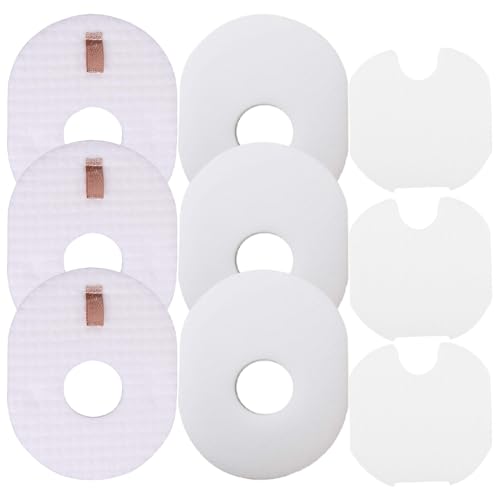
- Shark Rocket foam filter cleaning kit
- Shark Rocket pre-motor filter replacement set
- Shark Rocket HEPA filter replacement
- Shark vacuum filter cleaning brush
- Shark NV series filter replacement for Rocket

Before You Start
Before beginning, unplug the vacuum and remove the dust cup to access filters. Work in a well-ventilated area to avoid inhaling dust. Check the owner’s manual for exact filter locations, as models vary slightly. Wear protective gloves if debris is heavy, and ensure all parts are completely dry before reassembly to prevent mold growth and motor damage.
Estimated time for a full refresh: about 20–30 minutes. If filters are heavily clogged or damaged, plan extra time for replacement shopping. Keep a small trash bin handy to reduce mess during cleaning.
Step-By-Step: How To Clean Shark Rocket Filters
- Power off and unplug the Shark Rocket. Remove the dust cup and locate the foam, pre-motor, and HEPA filters.
- Remove the foam filter and rinse it under lukewarm running water. Gently squeeze—not wring—to release trapped dirt. Let it air dry completely on a clean surface.
- Inspect the pre-motor filter. If it’s worn or discolored, replace it with a new Shark Rocket pre-motor filter replacement set. If it’s reusable, rinse and allow to dry fully.
- Use the Shark vacuum filter cleaning brush to loosen embedded dust from the foam and pre-motor areas. A soft tapping can help dislodge stubborn debris without tearing the material.
- Remove the HEPA filter if present. Shake out loose dust over a trash bin, then rinse under cool water if the model allows. If the filter is heavily clogged or shows wear, install a Shark Rocket HEPA filter replacement.
- Let all filters dry completely—typically 24 hours for some components. Return the dry filters to the housing, ensuring seals are snug and orientation is correct.
- Reassemble the dust cup and the vacuum. Run a short test cleaning on a non-carpet area to confirm airflow and confirm that there are no unusual noises.
- Schedule the next maintenance based on usage. For homes with pets or heavy dust, more frequent cleaning and more frequent replacements may be necessary.
- Store spare filters in a clean, dry location to have replacements ready when needed.
Troubleshooting
| Symptom | Likely Cause | Fix | Prevention |
|---|---|---|---|
| Vacuum loses suction after cleaning | Clogged filters or incomplete drying | Thoroughly dry filters and recheck fit | Regular maintenance schedule |
| Strong odor from intake | Dirty filters or trapped debris | Clean or replace affected filters | Clean more frequently in dusty environments |
| Air leaks around housing | Improperly seated filters | Re-seat seals and verify orientation | Handle components gently during maintenance |
| Noisy operation after filter change | Damaged filter or misaligned parts | Inspect for breaks; replace if needed | Use compatible replacement parts |
Common Mistakes
- Using hot water on foam filters, which can shrink or deform them
- Not allowing filters to dry completely before reassembly
- Over-washing or wringing filters, which reduces filtration efficiency
- Mixing up filter types during replacement (foam vs HEPA vs pre-motor)
Following the recommended replacements and drying times helps maintain optimal suction and filtration performance.
Tips For Best Results
- Set a visible maintenance reminder to stay on schedule.
- Keep spare filters on hand to minimize downtime during replacements.
- Label filter components if removing multiple parts to speed reassembly.
- Periodically inspect the brush roll and intake area for hair buildup, which can hinder airflow even with clean filters.
Call A Professional
Consider consulting a professional if the vacuum emits unusual noises, loses suction despite clean filters, or exhibits electrical issues. Stop use and contact a service technician if there are exposed wires, overheating, or persistent malfunctions that do not respond to standard maintenance.
FAQ
How often should I clean the Shark Rocket foam filter?
Clean the foam filter monthly or sooner in homes with pets or heavy dust; replace if damaged or worn.
Can I wash the HEPA filter in warm water?
Wash only if the model’s instructions specifically allow it; otherwise, replace with a compatible HEPA filter.
What if the vacuum loses suction after filter cleaning?
Check that all filters are completely dry and correctly seated; inspect for a misfit or a clogged path.
Are Shark NV series filters compatible with all Rocket models?
Compatibility varies by model; use the designated replacement parts for your specific Rocket version.
Should I replace all filters at once?
Replacing worn filters together maintains optimal performance and airflow.
Buying Guide
When choosing replacement parts and filters for a Shark Rocket, consider several factors to ensure compatibility and performance. Size matters: verify model numbers and part compatibility before buying. Noise level can reflect system health; a well-maintained unit typically runs smoothly and quietly. Energy efficiency is tied to consistent suction and motor health, so routine maintenance helps keep efficiency up without extra power draw.
Controls and ease of use influence how often you perform maintenance. If possible, opt for filter kits that consolidate foam, pre-motor, and HEPA components to simplify replacements. Placement considerations include storing spare filters in a cool, dry location and keeping tools handy near the vacuum for quick maintenance. Compare kits by included parts, replacement frequency, and warranty coverage to ensure long-term satisfaction.
Ultimately, a proactive approach—regular cleaning, timely replacements, and proper storage—delivers steadier suction, better filtration, and a cleaner home without surprises.